payroll5 min readAugust 25, 2026👁 290 views
Sample Pay Stub Guide: How to Read Earnings, Taxes, and Net Pay
Understanding your pay stub is crucial for managing personal finances. This guide breaks down complex pay stub terminology so you can confidently read every section, from gross earnings to net pay.
Need this document right now?
Skip to our generator • Live PDF preview • Instant download
Quick answer The reader wants to understand the components of their paycheck and figure out exactly how much money they are taking home. They need clear definitions for terms like federal withholding, state tax, and various types of deductions.
This guide is general educational information for everyday document users, small business owners, landlords, contractors, and families. It is not legal, tax, or financial advice.
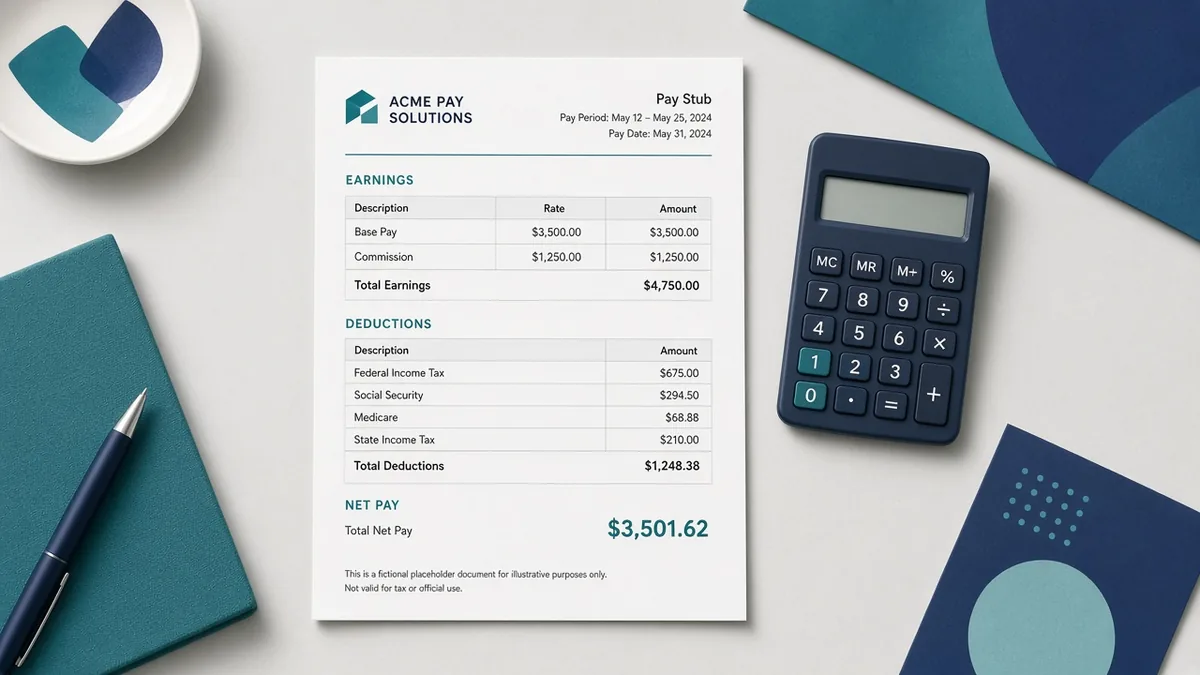
Why this document matters A pay stub provides a detailed record of your wages paid over a specific period. It shows your gross income—the total amount earned before any deductions. Deductions include taxes (federal, state, local), retirement contributions, and health insurance premiums. Understanding these components helps you budget accurately and track your financial history.
What to prepare before you start - Identify the pay period dates to ensure accuracy in reporting. - Locate 'Gross Pay' to determine total earnings before deductions. - Review all listed deductions (taxes, benefits) to understand withholdings. - Calculate 'Net Pay' by subtracting all deductions from your gross pay. - Compare current stubs with previous ones to spot any changes in rates or amounts.
Common mistakes to avoid - Assuming that only federal taxes are deducted; state, local, and payroll taxes also apply. - Confusing 'Gross Pay' (total earned) with 'Net Pay' (take-home pay). - Ignoring voluntary deductions like 401(k) or FSA contributions. - Treating the stub as a final record; always keep copies for your personal records.
Practical example If your gross pay is $3,000 and your total deductions amount to $550 (including taxes and benefits), your net pay will be $2,450. This simple calculation shows the direct impact of deductions on your usable income.
How iRunDocs fits into the workflow iRunDocs helps you move from scattered notes to a finished pay stub PDF. Start with the key facts, use the guided generator, review the preview carefully, and download the final document for your records. If the situation is complex, state-specific, or high-value, use the generated document as a clean starting point and get qualified professional review before relying on it.
Final review checklist - Check spelling on every name and business name. - Confirm dates, amounts, addresses, and deadlines. - Make sure the document title matches the actual situation. - Save the final PDF before sending it. - Keep proof of signature, delivery, payment, or acceptance when it matters.
FAQs ### What is the difference between Gross Pay and Net Pay? Gross Pay is your total earnings before any taxes or deductions are taken out. Net Pay is the actual amount you receive after all those withholdings.
Why do I see multiple tax deductions? You likely see separate amounts for Federal Income Tax, State Withholding Tax, and local taxes, as each governing body requires its own contribution.
Is my pay stub a record I need to keep? Yes. Keep copies of your pay stubs for at least several years; they are important documentation for filing taxes or verifying income.
Bottom line The strongest document is not the one with the most legal-sounding words. It is the one that captures the facts clearly, gives both sides a reliable reference point, and can be found later when it matters. For sample paystub, the best move is to prepare the facts first, generate the PDF carefully, and review before sending or signing.
sample paystubpay stub generatorpay stub formcreate pay stub online
Need a payroll Document?
Create professional documents in under 5 minutes with iRunDocs.
Create a Pay Stub →