payroll5 min readAugust 27, 2026👁 318 views
Commission Pay Stub Generator: How to Show Variable Pay Clearly
Understand how commission pay stubs work with our guide. Learn to clearly display variable compensation alongside fixed salary details.
Need this document right now?
Skip to our generator • Live PDF preview • Instant download
Quick answer The reader is looking for detailed information on properly documenting variable income sources like commissions and bonuses. They want to understand the structure and best practices for creating or interpreting a comprehensive pay stub.
This guide is general educational information for everyday document users, small business owners, landlords, contractors, and families. It is not legal, tax, or financial advice.
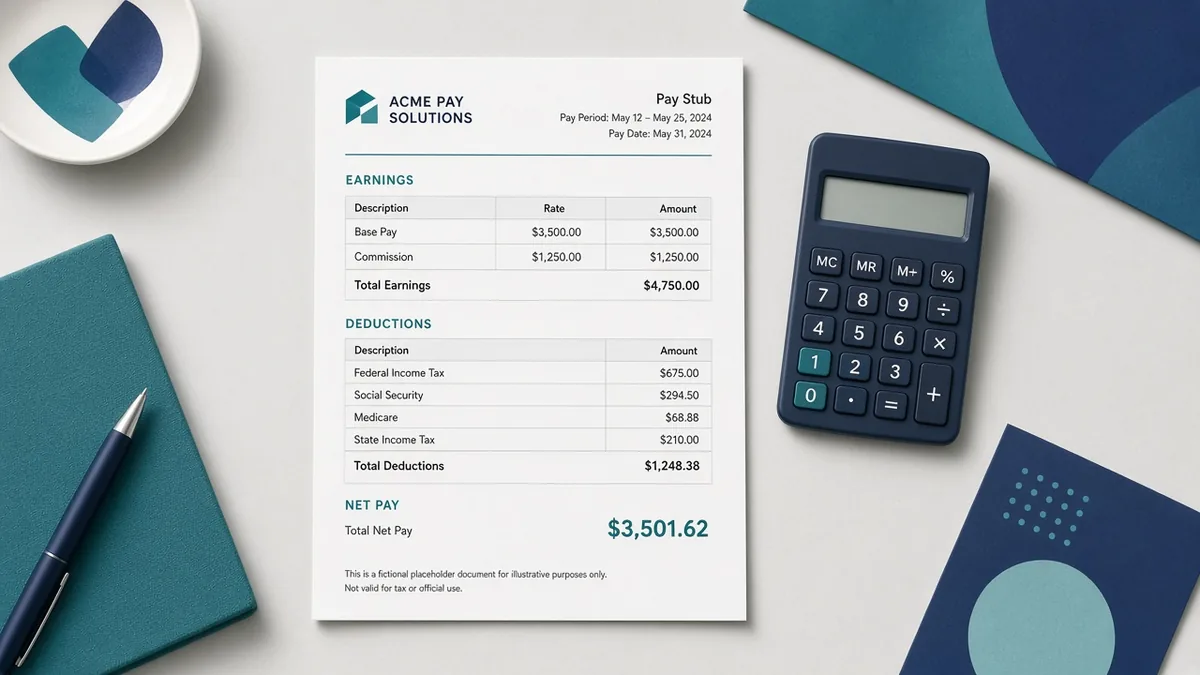
Why this document matters Commission-based compensation adds complexity to standard payroll records because earnings fluctuate based on performance. A clear pay stub must distinguish between fixed wages (salary) and variable wages (commissions, bonuses). Proper documentation ensures transparency for both the employee and the employer regarding total earned income.
What to prepare before you start - Verify all commission calculations against signed agreements. - Separate variable pay into distinct line items (e.g., 'Commission,' 'Bonus'). - Include a summary section detailing gross earnings before deductions. - Ensure your pay stub clearly lists the period of service for accuracy. - Cross-reference total pay with corresponding work records or sales reports.
Common mistakes to avoid - Mixing commission calculations with regular hourly wages on the same line item. - Failing to specify the payout period (e.g., 'Q3 Commission'). - Rounding commissions incorrectly, leading to discrepancies in gross pay. - Omitting required tax withholdings or benefit deductions from variable income.
Practical example If an employee earns $2,000 in base salary and $1,500 in quarterly commissions, the pay stub must show a total gross wage of $3,500. This separation allows for clear tracking of fixed vs. performance-based compensation.
How iRunDocs fits into the workflow iRunDocs helps you move from scattered notes to a finished pay stub PDF. Start with the key facts, use the guided generator, review the preview carefully, and download the final document for your records. If the situation is complex, state-specific, or high-value, use the generated document as a clean starting point and get qualified professional review before relying on it.
Final review checklist - Check spelling on every name and business name. - Confirm dates, amounts, addresses, and deadlines. - Make sure the document title matches the actual situation. - Save the final PDF before sending it. - Keep proof of signature, delivery, payment, or acceptance when it matters.
FAQs ### What is variable pay? Variable pay refers to income that changes based on performance, sales targets, or other metrics, such as commissions and bonuses.
Why must commissions be separate on the stub? Separating them provides transparency, allowing employees to track their earnings sources and helping employers maintain accurate payroll records.
Does commission pay affect tax withholding? Yes, all forms of earned income, including commissions, are subject to federal, state, and local taxes.
Bottom line The strongest document is not the one with the most legal-sounding words. It is the one that captures the facts clearly, gives both sides a reliable reference point, and can be found later when it matters. For commission pay stub generator, the best move is to prepare the facts first, generate the PDF carefully, and review before sending or signing.
commission pay stub generatorpay stub generatorpay stub formcreate pay stub online
Need a payroll Document?
Create professional documents in under 5 minutes with iRunDocs.
Create a Pay Stub →